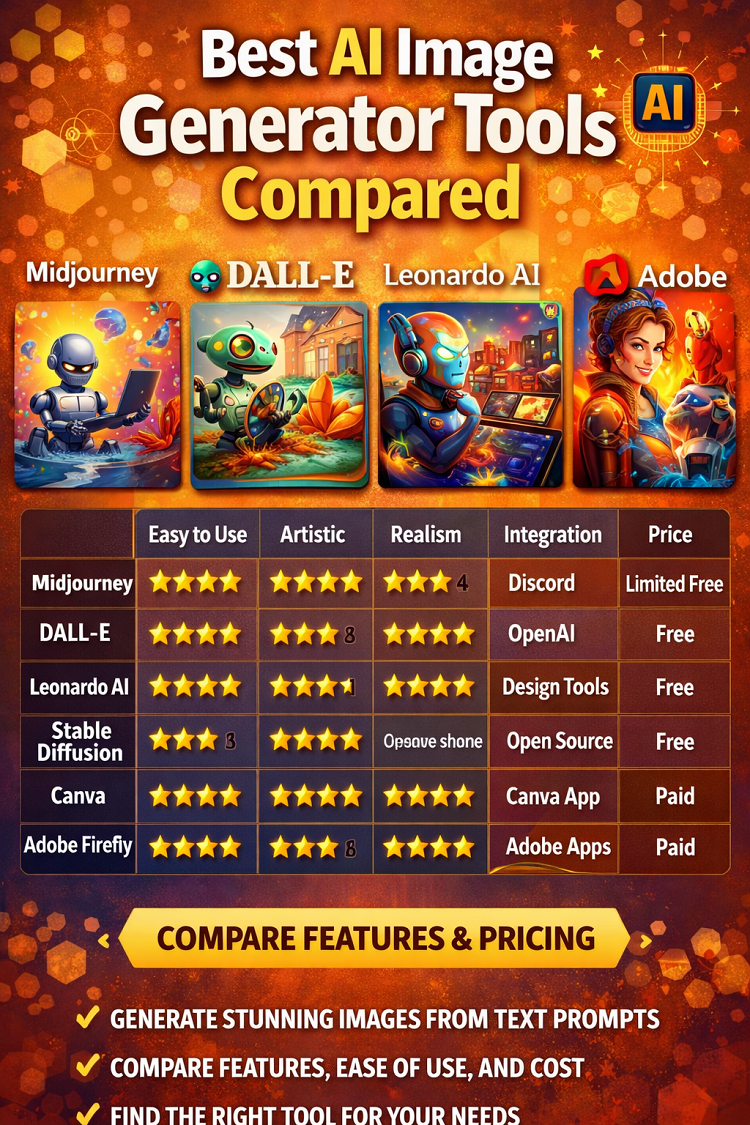
Best AI Image Generator Tools Compared
In recent years, artificial intelligence (AI) has transformed the way we create and interact with digital content. One of the most exciting developments is the rise of AI image generator tools platforms that use machine learning to generate stunning visuals based on text prompts, sketches, or style references. Whether you are a digital artist, marketer, content creator, or a business owner, these tools offer new creative possibilities at unprecedented speed.
But with so many options available, how do you choose the right one? In this comprehensive comparison, we explore the best AI image generator tools in 2026 their capabilities, strengths, weaknesses, pricing, ideal use-cases, and how they compare with one another.
What Are AI Image Generators?
AI image generators are software systems that use deep learning models, particularly generative models like generative adversarial networks (GANs) and diffusion models, to create images from textual descriptions or input parameters.
These tools can:
-
Generate realistic or artistic imagery
-
Produce concept art from prompts
-
Convert sketches into full-fidelity graphics
-
Style-transfer existing images
-
Create design assets, branding elements, and visual content for marketing
Unlike traditional graphic design tools, AI image generators can produce visuals without manual drawing or photography, making them powerful creative assistants.
Key Features to Consider When Choosing an AI Image Generator
Before diving into specific tools, let’s understand the essential features you should evaluate:
1. Image Quality and Style
Not all AI generators produce the same visual aesthetic. Some specialize in photorealism, while others excel in illustration, abstract art, or stylized renderings.
2. Speed and Efficiency
Time taken to generate images varies among platforms. For professional workflows, speed is a crucial factor.
3. User Interface and Ease of Use
Some tools require technical understanding, while others offer intuitive drag-and-drop interfaces.
4. Customization and Control
Look for tools that let you adjust composition, color, lighting, and artistic style.
5. Output Resolution
Higher resolution options are important for print, branding, and professional use.
6. Cost
AI tools range from free access to tiered paid plans, depending on usage and features.
7. Commercial Use Rights
Understand whether the tool allows you to use generated images for commercial purposes.
The Best AI Image Generator Tools Compared
Below is a detailed comparison of popular AI image generation tools, highlighting their key features, strengths, limitations, and best-use scenarios.
1. Midjourney
Midjourney is one of the most talked-about AI art generators, known for producing highly artistic and stylized images.
Key Features
-
Text-to-image generation with creative flair
-
Multiple style presets and modifiers
-
Discord-based interface with community prompts
-
Frequent updates with new artistic modes
Strengths
-
Exceptional at artistic, cinematic, fantasy, and stylized visuals
-
Large active community that shares prompt ideas
-
Regular new releases and capabilities
Limitations
-
Not ideal for strict photorealism
-
Learning curve due to Discord command-based system
Best For
-
Artists, creators, illustrators, concept designers
-
Social media visuals and creative storytelling
2. DALL-E (OpenAI)
Developed by OpenAI, DALL-E generates detailed, creative images with strong grounding in understanding textual nuances.
Key Features
-
Text-based generation with fine control over prompts
-
Edition tools to tweak existing images
-
Style and concept blending
Strengths
-
Excellent understanding of semantic prompts
-
Balanced between realism and artistic creativity
-
Simple web interface
Limitations
-
May require experimentation to get exactly desired results
-
Higher quality generations may be limited on free plans
Best For
-
General image creation
-
Marketing visuals, product concept art, and creative illustrations
3. Leonardo AI
Leonardo AI focuses on design quality and flexibility for artists and professionals.
Key Features
-
Advanced styling tools
-
Custom prompt control with adjustable parameters
-
Stable diffusion-based models with high-quality outputs
Strengths
-
Detail-rich images
-
UI tailored for creatives
-
Good balance between realism and creativity
Limitations
-
Paid plans required for advanced features
-
May be slower for bulk generation
Best For
-
Concept artists
-
Branding and advertising visuals
-
Designers seeking unique artistic output
4. Stable Diffusion (Various Interfaces)
Stable Diffusion is an open-source model used by many platforms (e.g., AUTOMATIC1111, DreamStudio).
Key Features
-
Highly customizable prompts and parameters
-
Extensible with community models and plugins
-
Local installation options
Strengths
-
Open-source flexibility
-
Community-driven enhancements
-
Can be run locally for privacy and cost control
Limitations
-
Technical setup for optimal use
-
Quality depends on frontend interface and model variant
Best For
-
Developers, tech enthusiasts
-
Custom builds and integrations
-
Users needing local generation
5. Canva AI Image Generator
Canva integrates AI image generation into its popular design platform.
Key Features
-
One-click generation within design layouts
-
Easy-to-use UI with design templates
-
Built-in editing tools
Strengths
-
Excellent for non-designers
-
Generates images that integrate directly into posters, slides, social posts
-
No external software required
Limitations
-
Less artistic depth compared to specialized tools
-
Limited to Canva “style” aesthetics
Best For
-
Social media managers
-
Small businesses creating marketing graphics
-
Educators and students
6. Adobe Firefly
Adobe’s AI image generator is part of its Creative Cloud ecosystem.
Key Features
-
Integration with Photoshop, Illustrator, and other Adobe apps
-
Text-to-image, text effects, and generative fill
-
High accuracy and creative flexibility
Strengths
-
Professional quality
-
Works seamlessly with Adobe tools
-
Built for designers and brands
Limitations
-
Requires Adobe subscription
-
Steeper learning curve for beginners
Best For
-
Professional designers
-
Branding and commercial production
-
Agencies and creative studios
Side-by-Side Feature Comparison
| Tool | Best For | Style Strength | Ease of Use | Commercial Rights | Free Tier |
|---|---|---|---|---|---|
| Midjourney | Artists & creators | Highly artistic | Moderate | Yes (depending on plan) | Limited |
| DALL-E | General image gen | Balanced | Easy | Yes | Yes |
| Leonardo AI | Designers | Detail-rich | Moderate | Yes | No |
| Stable Diffusion | Developers | Customizable | Technical | Yes | Yes (open-source) |
| Canva | Marketers | Functional | Very Easy | Yes | Yes |
| Adobe Firefly | Professionals | High-quality | Moderate | Yes | Limited |
How to Choose the Right AI Image Generator
Selecting the best tool depends on your specific needs. Here’s how to decide:
1. Purpose of Use
-
Marketing & Social Media: Canva, DALL-E
-
Professional Design: Adobe Firefly, Leonardo AI
-
Art & Illustration: Midjourney, Stable Diffusion
-
Technical Control & Customization: Stable Diffusion
2. Budget
Free tiers are great for experimentation. For commercial use or advanced features, paid plans are often worth the investment.
3. Skill Level
Beginners might prefer Canva and DALL-E. Artists and developers may choose Midjourney or Stable Diffusion.
4. Need for Integration
If you already use creative tools like Photoshop or Illustrator, Adobe Firefly offers smooth workflow integration.
Tips for Better Results With AI Image Tools
To get meaningful, high-quality images, follow these tips:
1. Use Clear, Descriptive Prompts
Instead of vague terms like “beautiful scene,” describe:
-
What objects should appear?
-
The artistic style
-
Lighting, mood, and perspective
Example: “A vibrant watercolor painting of a futuristic city at sunset, glowing neon lights, detailed skyline.”
2. Experiment With Styles
Try different stylistic keywords like:
-
Photorealistic
-
Surreal
-
Cyberpunk
-
Minimalist
-
Retro
3. Adjust Output Parameters
Some tools let you change:
-
Aspect ratio
-
Detail level
-
Color saturation
-
Seed numbers for variation
4. Use Negative Prompts
In some tools, you can instruct the AI on what not to include, improving quality.
5. Learn From the Community
Many platforms have public galleries and prompt libraries you can study or remix.
Ethical and Legal Considerations
As AI visuals become widespread, it’s important to consider:
1. Copyright and Ownership
Not all tools grant unrestricted commercial rights. Always check terms of use.
2. Bias and Representation
AI models might reflect biases in training data. Be aware and ethical in how you depict people and cultures.
3. Deepfake Risks
Never use AI imagery to create fake or deceptive content involving real individuals without consent.
4. Attribution Practices
Some platforms require or encourage mentioning the AI tool used in public content.
The Future of AI Image Generation
AI image generators are rapidly evolving. In 2026 and beyond, we expect:
-
Higher fidelity with real-time collaboration
-
3D AI image outputs
-
Integrated generative video tools
-
Personalized models trained on individual creator preferences
These innovations will further transform creative industries.
Conclusion
AI image generator tools are redefining creativity across industries — from individual creators to global brands. Each tool has its unique strengths and target audience. Whether you’re crafting concept art, marketing visuals, or design prototypes, this comparison helps you choose the best option for your needs.
Here’s a quick recap:
-
Midjourney — artistic and visually expressive
-
DALL-E — versatile and intuitive
-
Leonardo AI — designer-centric with rich detail
-
Stable Diffusion — customizable and open-source
-
Canva — beginner-friendly for social graphics
-
Adobe Firefly — professional, integrated into Creative Cloud
By understanding these tools and matching them with your goals, you can unlock powerful creative potential with AI.
