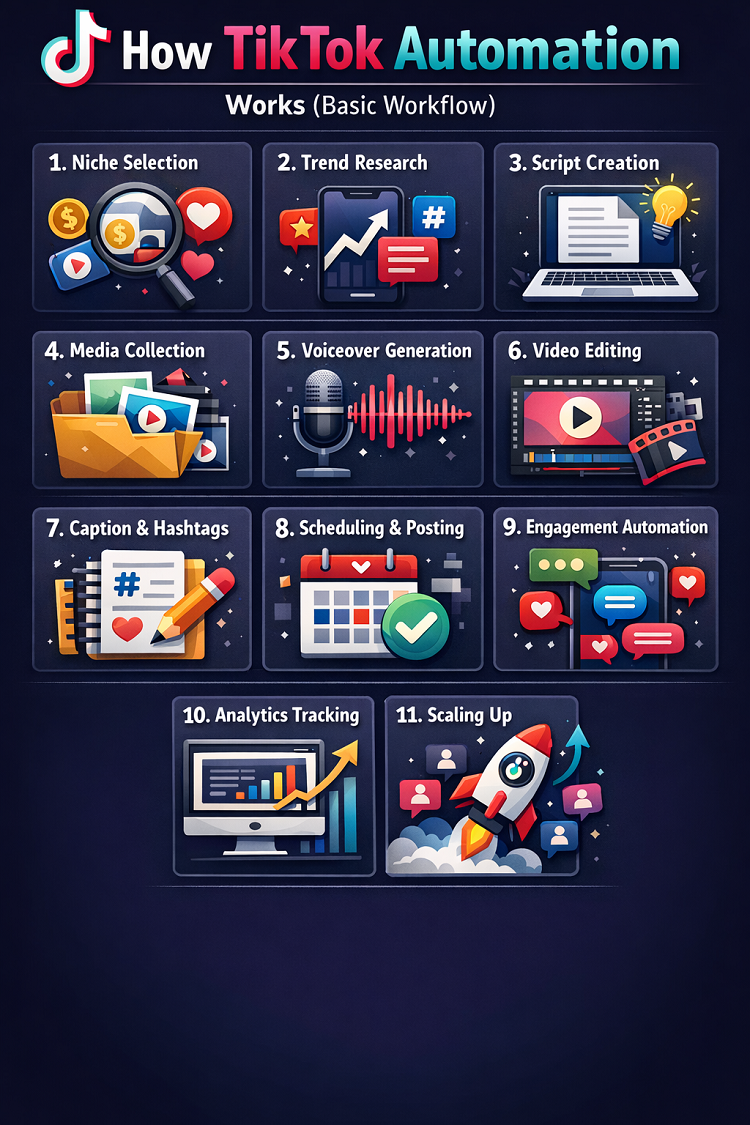
How TikTok Automation Works (Basic Workflow)
In recent years, TikTok has become one of the most powerful platforms for content creators, businesses, and online earners. With millions of videos uploaded daily, staying consistent and competitive can be overwhelming. This is where TikTok automation comes in.
TikTok automation is not just a shortcut it is a systematic workflow that uses tools, AI, and processes to handle repetitive tasks efficiently. Instead of manually creating, posting, and managing every piece of content, automation allows creators to scale faster and smarter.
In this article, we will break down how TikTok automation works step by step, explain the complete workflow, and show how beginners can implement it correctly.
What Is TikTok Automation?
TikTok automation refers to using software, AI tools, and systems to perform repetitive tasks like posting videos, replying to messages, and analyzing performance automatically.
Instead of doing everything manually, automation allows you to:
- Schedule content in advance
- Generate videos using AI
- Auto-reply to comments and messages
- Track analytics automatically
- Manage multiple accounts
However, it’s important to understand one key point:
👉 Automation supports your work it does not replace strategy or creativity.
Before understanding the workflow, you need to know why automation matters.
1. Saves Time
Managing TikTok manually can take hours daily. Automation reduces repetitive work significantly.
2. Improves Consistency
TikTok rewards regular posting. Automation ensures your content goes live on time every day.
3. Helps Scale Faster
Automation allows creators to manage multiple accounts and publish more content efficiently.
4. Boosts Engagement
Automated replies and quick responses keep audiences engaged.
5. Enables Data-Driven Growth
Automation tools collect analytics so you can improve your strategy.
According to industry insights, automation can save 60–80% of time spent on repetitive tasks while improving efficiency.
The Basic Workflow of TikTok Automation
Now let’s break down the complete TikTok automation workflow step by step. This is the most important part of the article.
Step 1: Niche Selection & Content Strategy
Everything starts with choosing the right niche.
Popular TikTok Automation Niches:
- Motivation videos
- Facts & educational content
- Storytelling
- Finance & business
- Health tips
- AI-generated content
Before automation, you must answer:
- Who is your target audience?
- What type of content will you post?
- What problem are you solving?
👉 Automation works best when your niche is clear.
Step 2: Content Research (Trend Analysis)
Content Research (Trend Analysis)
| Element to Analyze | What to Look For | Why It Matters |
|---|---|---|
| Trending Videos | High views, shares, and recent uploads | Helps identify what type of content is going viral |
| Trending Sounds | Popular audio clips used in multiple videos | Increases chances of reaching more audience |
| Hashtags | Frequently used and niche-specific hashtags | Improves discoverability and SEO |
| Competitor Content | Top-performing videos in your niche | Learn what works and replicate success |
| Posting Time | When viral videos are posted | Helps optimize your posting schedule |
| Audience Engagement | Likes, comments, shares ratio | Shows what audience prefers |
TikTok’s algorithm promotes trending content. That’s why research is essential.
What to Analyze:
- Trending sounds
- Viral videos
- Hashtags
- Competitor content
TikTok’s algorithm pushes videos based on engagement signals like watch time, likes, and shares.
Tools Used:
- TikTok Creative Center
- Trend analysis tools
- Competitor accounts
Automation can help collect trending data automatically, saving hours of manual work.
Step 3: Script Generation (AI Content Creation)

Once you find a trend, the next step is creating a script.
This is where AI tools come in.
Example Workflow:
- Input topic → AI generates script
- Optimize for hooks and engagement
- Keep videos short (15–60 seconds)
Automation tools can generate:
- Hooks
- Storylines
- Captions
Modern systems even adapt scripts based on trending content patterns.
Step 4: Media Collection (Images & Video Clips)
Now you need visuals for your TikTok video.
Sources:
- Stock footage
- Copyright-free videos
- AI-generated visuals
- Clips from long videos
Automation can:
- Pull clips automatically
- Match visuals with scripts
- Organize media files
This step is crucial for creating engaging videos quickly.
Step 5: Voiceover Generation (AI Voice)
Instead of recording your voice manually, automation uses AI voice tools.
Options:
- Text-to-speech (AI voice)
- Human voice recording
- Hybrid (AI + manual editing)
AI voice tools can:
- Convert script into voice
- Add emotions
- Support multiple languages
This is especially useful for faceless TikTok accounts.
Step 6: Video Editing (Automated or Semi-Automated)
Now comes the editing stage.
What Happens Here:
- Combine video clips
- Add voiceover
- Insert captions
- Add effects and transitions
Automation tools can:
- Sync audio with visuals
- Auto-add subtitles
- Apply templates
Modern automation tools can even generate full videos automatically using AI.
Step 7: Caption, Hashtags & SEO Optimization
Before posting, you need optimization.
Important Elements:
- Caption (short and engaging)
- Hashtags (relevant + trending)
- Keywords
Automation tools can:
- Generate captions
- Suggest hashtags
- Optimize for TikTok SEO
This increases the chances of your video going viral.
Step 8: Scheduling & Auto Posting
This is where automation becomes powerful.
Instead of posting manually, tools can schedule posts.
How It Works:
- Upload video
- Select time and date
- Automation tool publishes it
Scheduling tools ensure:
- Consistency
- Time optimization
- Better reach
This is one of the safest and most widely used automation methods.
Step 9: Engagement Automation (Use Carefully)
After posting, engagement matters.
Automated Tasks:
- Replying to comments
- Responding to messages
- Lead capture
Automation tools can:
- Send instant replies
- Filter spam
- Trigger responses based on keywords
⚠️ Important:
TikTok does not allow certain types of automated engagement like auto-liking or fake interactions.
Use only safe and approved automation methods.
Step 10: Analytics & Performance Tracking
Automation doesn’t stop after posting.
Key Metrics:
- Views
- Watch time
- Engagement rate
- Followers growth
Automation tools:
- Generate reports
- Track performance
- Suggest improvements
This helps you refine your content strategy.
Step 11: Scaling the System
Once your workflow is working, you can scale.
Scaling Methods:
- Multiple accounts
- More daily posts
- Different niches
- Outsourcing tasks
Automation allows you to:
- Manage 10+ accounts
- Post consistently
- Increase earnings
However, scaling must be done carefully to avoid account bans.
Visual Summary of TikTok Automation Workflow
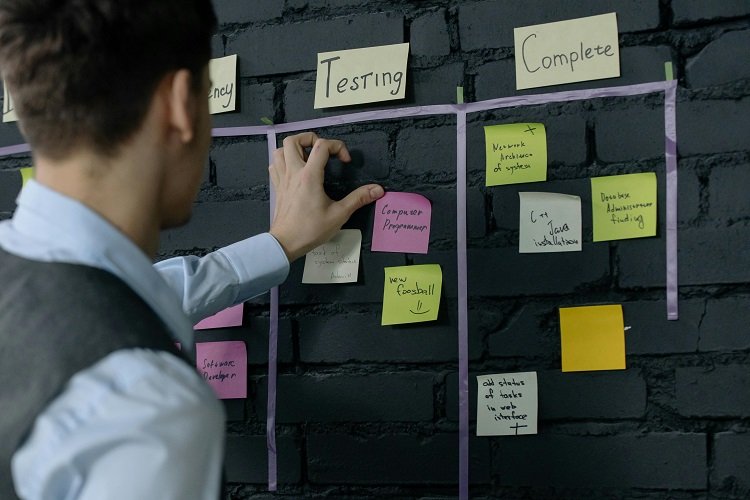
Here’s a simple breakdown:
- Niche Selection
- Trend Research
- Script Creation
- Media Collection
- Voiceover Generation
- Video Editing
- Caption & Hashtags
- Scheduling
- Engagement
- Analytics
- Scaling
Types of TikTok Automation
Not all automation is the same.
1. Safe Automation
- Scheduling posts
- Analytics tracking
- AI content creation
2. Moderate Automation
- Auto-replies
- Lead generation
3. Risky Automation
- Auto-likes
- Auto-follow/unfollow
- Fake engagement
TikTok actively detects and penalizes risky automation practices.
Benefits of TikTok Automation Workflow
✔ Efficiency
You can create multiple videos in less time.
✔ Consistency
Daily posting becomes easier.
✔ Scalability
Run multiple accounts simultaneously.
✔ Monetization
More content = more earning opportunities.
Risks & Challenges
Automation is powerful, but not risk-free.
❌ Account Ban Risk
Using bots or fake engagement can get your account banned.
❌ Low-Quality Content
Over-automation can produce generic content.
❌ Lack of Creativity
Human creativity is still essential.
❌ Platform Restrictions
TikTok limits automation in certain areas.
Best Practices for TikTok Automation
To succeed safely, follow these tips:
1. Focus on Content Quality
Automation should enhance—not replace—quality.
2. Use Approved Tools
Avoid shady bots and scripts.
3. Stay Consistent
Post regularly but naturally.
4. Monitor Performance
Always track what works.
5. Combine Manual + Automation
Best results come from hybrid workflows.
Real Example of TikTok Automation Workflow
Let’s say you run a motivational TikTok account:
- Find trending quotes
- Generate script using AI
- Use stock footage
- Add AI voiceover
- Edit video automatically
- Add captions + hashtags
- Schedule posts
- Auto-reply to comments
- Track performance
This entire process can be done in 1–2 hours for multiple videos.
Future of TikTok Automation
The future is heavily influenced by AI.
Trends:
- Fully AI-generated videos
- Smart editing tools
- Predictive analytics
- Personalized content automation
Automation is evolving from simple scheduling to complete content systems.
Final Thoughts
TikTok automation is not about cheating the system—it’s about working smarter, not harder.
A successful TikTok automation workflow includes:
- Strategy
- Creativity
- Consistency
- Smart use of tools
If used correctly, automation can help you:
- Grow faster
- Save time
- Earn more
But remember:
👉 The most successful creators combine automation with human creativity.
