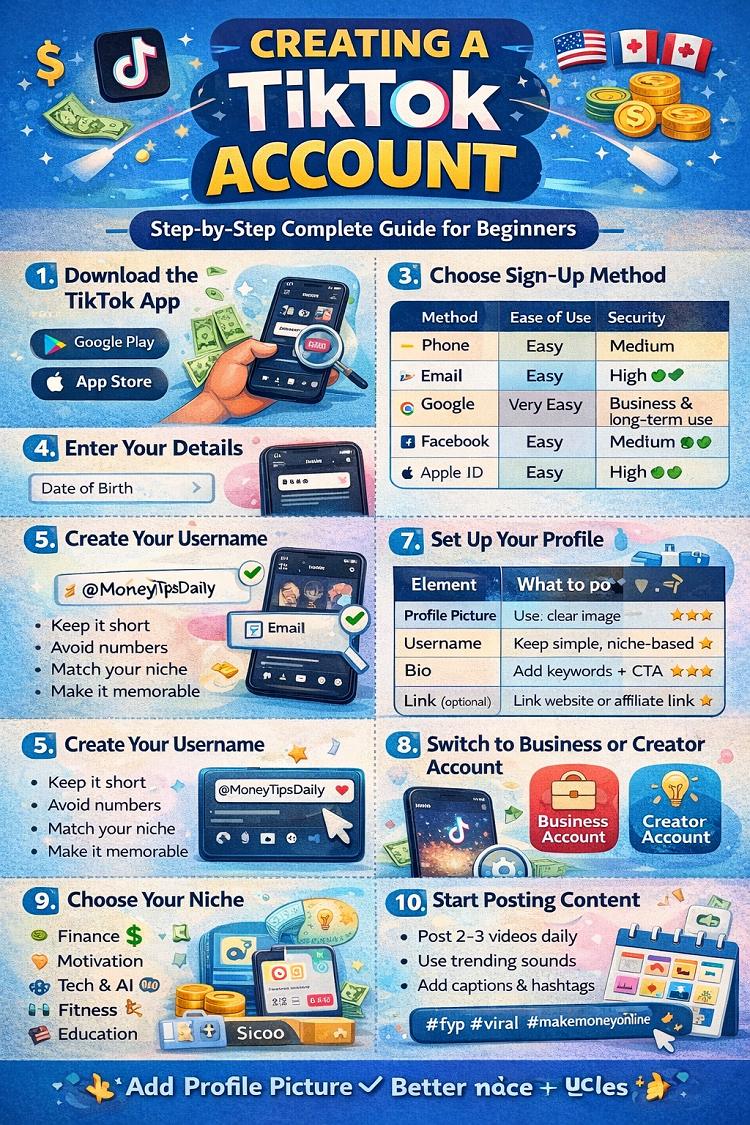
Creating a TikTok Account (Step-by-Step Complete Guide for Beginners)
TikTok is one of the fastest-growing social media platforms in the world, especially in high-value regions like the United States, United Kingdom, and Canada. Whether your goal is entertainment, personal branding, or making money online, creating a TikTok account is the very first step.
In this complete guide, you’ll learn how to create a TikTok account step by step, along with expert tips to optimize your profile for growth and monetization.
What is TikTok?
TikTok is a popular social media platform where users create and share short videos. These videos can include entertainment, education, trends, business promotion, and much more.
TikTok is especially powerful because:
- It allows viral growth even for new accounts
- It has millions of active users daily
- It provides earning opportunities
Why You Should Create a TikTok Account
Before we dive into the steps, here’s why creating a TikTok account is worth it:
- 📈 Reach a global audience (especially USA, UK, Canada)
- 💰 Earn money through multiple methods
- 🎯 Build a personal or business brand
- 🚀 Grow fast even without followers
Step-by-Step Guide to Create a TikTok Account
Follow these simple steps to create your account successfully.
Step 1: Download the TikTok App
First, you need to install TikTok on your device.
How to Download:
- Go to the Google Play Store (Android)
- Go to the Apple App Store (iPhone)
- Search for TikTok
- Click Install
Once installed, open the app.
Step 2: Open TikTok and Tap “Sign Up”
When you open TikTok:
- Tap on “Profile” (bottom right corner)
- Then click “Sign Up”
You will now see different options to create your account.
Step 3: Choose Sign-Up Method
TikTok allows multiple ways to register:
Available Options:
- 📱 Phone number
- 📧 Email address
- 🔗 Google account
- 🔗 Facebook account
- 🔗 Apple ID
👉 Best Option: Use Email for better control and security.
Step 4: Enter Your Details
You will need to provide:
- Date of birth
- Email or phone number
- Password
Tips:
- Use a strong password
- Use a professional email (especially for business accounts)
Step 5: Create Your Username
Your username is very important because it represents your brand.
Tips for Choosing a Username:
- Keep it short and simple
- Avoid numbers and symbols
- Match your niche (e.g., @MoneyTipsDaily)
- Make it easy to remember
👉 Example:
- @WealthHacks
- @DailyMotivationPro
- @TechInsightsHub
Step 6: Verify Your Account
TikTok will send a verification code to:
- Your email OR
- Your phone number
Enter the code to confirm your account.
Step 7: Set Up Your Profile
Now your account is created, but you must optimize your profile.
Add Profile Picture:
- Use a clear image
- Use a logo for business pages
Write a Bio:
Your bio should:
- Explain what your page is about
- Include keywords
- Add a call-to-action
👉 Example Bio:
“Helping you make money online 💰 | Daily tips | Follow for growth 🚀”
Add Link (Optional):
Once eligible, you can add:
- Website link
- Affiliate link
Step 8: Switch to a Business or Creator Account
This step is VERY important for growth and monetization.
How to Switch:
- Go to Settings
- Click Manage Account
- Select Switch to Business Account or Creator Account
Benefits:
- Access to analytics
- Better reach insights
- Professional features
Step 9: Choose Your Niche
Before posting, decide what type of content you will create.
Best Niches for USA/UK/Canada:
- 💰 Finance & side hustles
- 🧠 Motivation
- 🤖 AI & tech
- 🏋️ Fitness
- 📚 Educational content
Choosing a niche helps TikTok understand your content and show it to the right audience.
Step 10: Start Posting Content
Now comes the most important part posting videos.
Beginner Strategy:
- Post 2–3 videos daily
- Use trending sounds
- Add captions
- Use hashtags
Content Ideas:
- Tips and tricks
- Short tutorials
- Facts videos
- Motivational clips
Step 11: Use Hashtags Smartly
Hashtags help TikTok understand your content.
Example Hashtags:
- #fyp
- #viral
- #makemoneyonline
- #tiktokgrowth
👉 Use 3–5 relevant hashtags per video.
Step 12: Stay Consistent
Consistency is the key to success on TikTok.
Posting Plan:
- Daily uploads
- Test different content styles
- Focus on quality + quantity
Common Mistakes to Avoid
Avoid these beginner mistakes:
❌ Choosing random niche
❌ Posting low-quality videos
❌ Inconsistent uploads
❌ Ignoring trends
❌ Poor profile setup
Pro Tips for Faster Growth
Here are some expert tips to grow quickly:
- Hook viewers in first 3 seconds
- Use captions on videos
- Keep videos short (7–15 seconds)
- Focus on storytelling
- Analyze viral content
How Long Does It Take to Grow?
Growth depends on:
- Content quality
- Consistency
- Niche
Typical Results:
- 1–2 weeks: First viral video
- 1 month: 1K–10K followers
- 3 months: Monetization potential
Final Thoughts
Creating a TikTok account is simple, but growing it requires strategy and consistency. If you follow this step-by-step guide, you can build a strong foundation and start your journey toward success.
TikTok is not just a social media platform it’s a powerful tool for building a brand, growing an audience, and making money online.
Start today, stay consistent, and keep improving your content. Your first viral video might be just one post away 🚀
If you want, I can also:
✅ Create images for each step (like your previous posts)
✅ Give you viral content ideas for your niche
✅ Help you set up a TikTok automation system step-by-step
Creating a TikTok Account (Step-by-Step Complete Guide for Beginners)
TikTok is one of the fastest-growing social media platforms in the world, especially in high-value regions like the United States, United Kingdom, and Canada. Whether your goal is entertainment, personal branding, or making money online, creating a TikTok account is the very first step.
In this complete guide, you’ll learn how to create a TikTok account step by step, along with expert tips to optimize your profile for growth and monetization.
What is TikTok?
TikTok is a popular social media platform where users create and share short videos. These videos can include entertainment, education, trends, business promotion, and much more.
Why You Should Create a TikTok Account
- 📈 Reach a global audience (especially USA, UK, Canada)
- 💰 Earn money through multiple methods
- 🎯 Build a personal or business brand
- 🚀 Grow fast even without followers
Step-by-Step Guide to Create a TikTok Account
Step 1: Download the TikTok App
- Go to Google Play Store or Apple App Store
- Search for TikTok
- Click Install and open the app
Step 2: Tap “Sign Up”
- Open the app
- Tap Profile (bottom right)
- Click Sign Up
Step 3: Choose Sign-Up Method
TikTok gives multiple options to register. Here’s a comparison to help you choose the best one:
📊 Sign-Up Methods Comparison Table
| Method | Ease of Use | Security | Best For |
|---|---|---|---|
| Phone Number | Easy | Medium | Quick signup |
| Email Address | Easy | High ✅ | Business & long-term use |
| Google Account | Very Easy | Medium | Fast login |
| Easy | Medium | Social integration | |
| Apple ID | Easy | High | iPhone users |
👉 Recommendation: Use Email Address for better control and professionalism.
Step 4: Enter Your Details
- Add your date of birth
- Enter email or phone number
- Create a strong password
Step 5: Create Your Username
Tips:
- Keep it short
- Avoid numbers
- Match your niche
- Make it memorable
👉 Example: @MoneyTipsDaily, @TechGrowthHub
Step 6: Verify Your Account
- Enter the code sent to your email or phone
- Confirm your account
Step 7: Set Up Your Profile
Profile Optimization Checklist
| Element | What to Do | Importance |
|---|---|---|
| Profile Picture | Use clear image or logo | High ⭐⭐⭐ |
| Username | Keep simple and niche-based | High ⭐⭐⭐ |
| Bio | Add keywords + CTA | High ⭐⭐⭐ |
| Link (if available) | Add website or affiliate link | Medium ⭐⭐ |
👉 A professional profile increases trust and followers.
Step 8: Switch to Business or Creator Account
- Go to Settings
- Click “Manage Account”
- Choose Business or Creator
Benefits:
- Analytics access
- Growth insights
- Monetization features
Step 9: Choose Your Niche
Best niches for high-paying audiences:
- 💰 Finance
- 🧠 Motivation
- 🤖 Tech & AI
- 🏋️ Fitness
- 📚 Education
Step 10: Start Posting Content
Beginner Strategy:
- Post 2–3 videos daily
- Use trending sounds
- Add captions and hashtags
Step 11: Use Hashtags Smartly
- Use 3–5 hashtags
- Keep them relevant
👉 Example: #fyp #viral #makemoneyonline
Step 12: Stay Consistent
Consistency is the key to growth on TikTok.
Common Mistakes to Avoid
❌ Random niche selection
❌ Low-quality videos
❌ Inconsistent posting
❌ Poor profile setup
Pro Tips for Faster Growth
- Grab attention in first 3 seconds
- Use captions in videos
- Keep videos short (7–15 seconds)
- Follow trends
Final Thoughts
Creating a TikTok account is simple, but growing it requires strategy and consistency. By following this step-by-step guide and using the tables above, you can build a strong and professional TikTok presence.
